

There’s a moment in almost every landing zone build where someone says, “Networking is done.” The VNets exist. Peering works. Traffic flows. Demos succeed.
Then a second team onboards. They need hybrid access to Active Directory. An app team wants to reach Azure SQL without a public endpoint. Someone peers two spokes directly because it’s faster than opening a firewall ticket. DNS stops resolving for a private endpoint nobody knew existed.
Nothing collapsed. It just got harder to explain.
That’s usually when teams realize networking wasn’t finished—it was just first.
This is article six in the Azure Landing Zone series. Management groups, subscriptions, policy, and identity are in place. Networking is where all of that meets traffic.
How Good Networks Go Bad
Nobody plans a messy network. It accumulates.
One team deploys a workload in its own VNet. Another team does the same. They peer because they need to talk. Something breaks, so someone opens an NSG rule. A third service needs access, so the rule gets wider. Repeat that across twelve months and three business units, and you don’t have a design anymore. You have history.
I’ve walked into environments that looked segmented on paper and behaved like flat networks in practice. Broad peering. Permissive NSGs. Spokes talking directly to each other because someone needed it once and never cleaned it up.
Every individual decision made sense. The system didn’t.
The Week Private Endpoints Broke Onboarding
I’ve seen this play out in a real landing zone.
The platform team had done the hard work. Hub-and-spoke was in place. ExpressRoute was live. Azure Firewall sat in the middle. Policy blocked public IPs on VMs. From an architecture review, it looked solid.
Then a workload team onboarded and deployed Azure SQL with a private endpoint, the way policy required. The app team’s pipeline succeeded. The database existed. The endpoint showed healthy in the portal.
The application couldn’t connect.
Not intermittently. Consistently. Timeouts from the app tier, every time.
Hours went into NSG rules. Someone checked the route table. Someone else verified the firewall allow list. All reasonable steps. All wrong layer.
The app was resolving mydatabase.database.windows.net to the public IP—not the private endpoint address in the 10.x range. The private DNS zone existed in the hub, but the app spoke’s VNet had never been linked to it. The platform team assumed DNS was handled because the zone was created. The workload team assumed connectivity was handled because the endpoint was deployed.
Two teams, each doing their part. Neither owned the seam between them.
We linked the zone, validated resolution from a jump box in the spoke, ran the app again, and it worked. Total fix time: twenty minutes. Total diagnosis time: most of a day, because everyone started at the firewall instead of running nslookup.
That incident changed how the organization treated DNS—as platform infrastructure with the same ownership model as the hub firewall, not an app team checkbox.
If you take nothing else from this article: private endpoints don’t fail at the endpoint. They fail at DNS, routing, or the handoff between platform and workload teams.
You’re Designing Behavior, Not Boxes
VNets, subnets, gateways, load balancers—these are components. What you’re actually designing is how traffic behaves.
Where does it enter? Where does it get inspected? What can talk to what once it’s inside? Can you answer those questions without opening a diagram that hasn’t been updated in six months?
In an enterprise landing zone, the answer has to be yes—and it has to stay yes as the estate grows. That means enforcement, not documentation in a wiki nobody reads.
VNets and Hub-and-Spoke
In a landing zone, VNets aren’t throwaways per application. They’re structural.
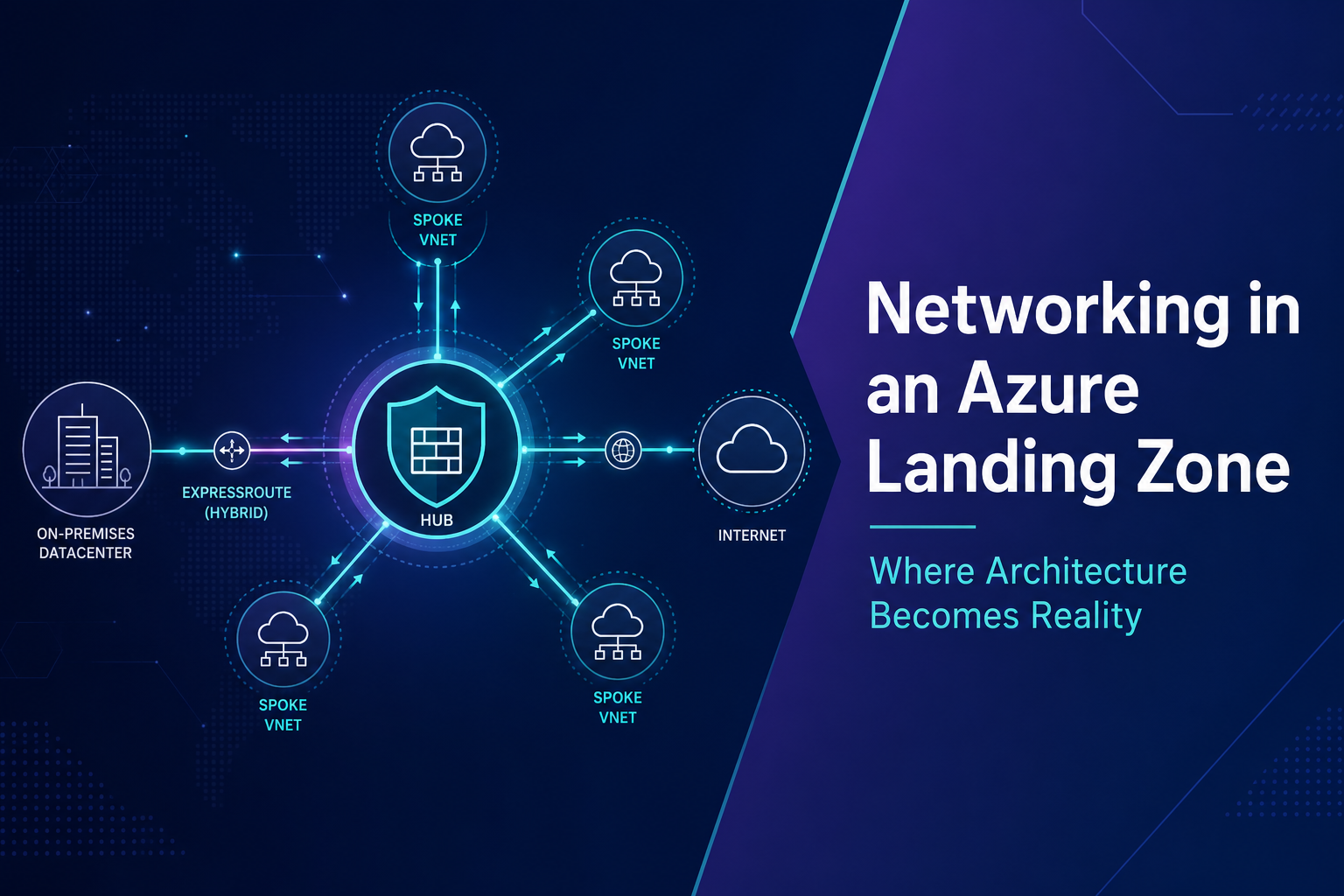
The platform connectivity subscription hosts the hub: firewall, VPN and ExpressRoute gateways, DNS Private Resolver, centralized private DNS zones, Bastion or jump access. Spokes hold workloads—apps, data, integrations—and peer to the hub. In a properly enforced model, spokes don’t peer to each other directly.
Hub-and-spoke gets treated like a template. It’s not. It’s a control strategy. The point isn’t the shape of the diagram. The point is that meaningful traffic passes through a control point.

If traffic can shortcut around the firewall—spoke to spoke, uncontrolled outbound, hybrid routes that bypass inspection—you don’t have a hub. You have a shared VNet with extra steps.
UDRs pointing default and inter-spoke routes at the firewall are what make the model real. Peering settings matter too. When spokes peer to the hub and enable “Use remote gateway,” they inherit hybrid routes from the hub’s Virtual Network Gateway—on-premises prefixes, ExpressRoute learned routes, VPN tunnels. That’s how a workload in a spoke reaches AD in the datacenter without deploying its own gateway.
But inheritance cuts both ways. If the hub propagates routes without filtering, you can leak on-premises prefixes into spokes that shouldn’t carry them, or create overlapping paths that make routing unpredictable. Platform teams should control route propagation at the hub—use route filters on ExpressRoute, summarize where you can, and document which spokes are allowed to use remote gateway. Not every spoke needs a path to on-prem. Some shouldn’t have one.
IP Planning: The Mistake You Don’t Feel Until Later
Teams pick 10.0.0.0/16 because it’s easy. Six months later they’re overlapping with on-premises ranges, or with another business unit’s estate, or with an acquisition nobody accounted for.
Define the IP plan before the first VNet deploys. Reserve space for the hub, for spoke categories, for growth. Document what’s routable to on-prem. Use policy to block VNet creation outside approved ranges.
Specialized subnets have rules that aren’t optional:
GatewaySubnet — Minimum /27. Only the Virtual Network Gateway lives here. No other resources. No NSG can be attached to GatewaySubnet. Azure blocks it. If someone tells you to “lock down the gateway with an NSG,” that advice doesn’t apply here—protection comes from route design and on-premises edge controls, not subnet NSGs.
AzureFirewallSubnet — Dedicated to the firewall appliance only. Same constraint: no other resources mixed in.
Private endpoint subnets — Dedicated /24 or larger, separate from application tiers. Set private_endpoint_network_policies appropriately for your design. Don’t delegate these subnets to other services—delegation to App Service, AKS, or similar will block private endpoint deployment. I’ve seen both failure modes: someone tried to deploy a storage private endpoint into GatewaySubnet and the deployment failed; someone else crammed app VMs into a PE subnet and created a segmentation mess that took a change window to untangle.
NICs, Gateways, and Load Balancers
Traffic doesn’t move through address spaces. It moves through network interfaces, gateways, and load balancers. Azure also uses the word “gateway” for two completely different things, which causes no end of confusion in design reviews.
Network interfaces
If something lives in a VNet, it connects through a NIC. VMs, private endpoints, load balancer backends—all of it.
Every VM gets at least one NIC in a subnet with a private IP. NSGs and ASGs attach here. When you can’t reach a server, you’re usually debugging a NIC: wrong IP, wrong NSG, wrong route table, missing ASG, or—when private endpoints are involved—wrong DNS zone link so the FQDN resolves to a public address instead of the private IP on the endpoint NIC.
Private endpoints are NICs too. Azure drops one in your subnet with a private IP, and that’s how the PaaS service becomes reachable on your network.
In a landing zone, production VMs shouldn’t carry public IPs on their NICs. Inbound internet traffic should hit an Application Gateway, Azure Front Door, or load balancer first. Outbound should route through the hub firewall. If you’re writing NSG rules by hunting IP addresses instead of using ASGs, you’ll feel that pain the first time a subnet gets resized.
Virtual Network Gateway vs Application Gateway
The Virtual Network Gateway lives in GatewaySubnet in the hub. It’s how Azure connects to on-premises—VPN over the internet, or ExpressRoute over a private circuit. It handles BGP route exchange. Layer 3. Hybrid north-south traffic. Not web routing. Not load balancing.
Application Gateway is a Layer 7 load balancer with optional WAF. HTTPS termination, path-based routing, host headers. It sits at the edge of a workload—usually in a spoke—and distributes traffic to VM NICs in backend pools.
Same word. Different jobs. I’ve seen teams provision the wrong one because the names were close enough to sound interchangeable in a meeting.
Load balancers and where Front Door fits
Azure Load Balancer works at Layer 4—TCP/UDP by IP and port. No HTTP awareness. Internal load balancers are common inside spokes for HA across app tier VMs that should never be internet-facing. A private frontend IP in the VNet, backends pointed at NIC IPs, health probes confirming the pool is alive.
Application Gateway is regional. It owns web traffic inside a spoke or hub edge—WAF, SSL offload, cookie-based affinity, URL path routing. If your users hit a single region and you need deep HTTP control, this is the tool.
Azure Front Door is global. It sits at Microsoft’s edge, closer to users, and routes to backends across regions. CDN caching, global failover, bot protection, and WAF at the edge. In larger landing zones, the pattern is often Front Door at the global entry point, Application Gateway or internal load balancers behind it in each region. Front Door handles “get the user to the right region.” Application Gateway handles “route this HTTP request to the right pool inside the region.”
They’re not either/or at scale. They’re different layers of the same ingress stack.
Backends are always NIC IPs (or IP configurations tied to NICs). That connection matters when you’re troubleshooting health probes or wondering why a pool shows unhealthy—the probe is hitting an IP on a NIC, and if the NSG on that NIC doesn’t allow the probe source, the backend goes down even when the app is fine.

A user on the internet may hit Front Door first, then Application Gateway, then web tier NICs. Web talks to app tier NICs. App reaches the database through a private endpoint NIC. An admin on-premises comes in through the Virtual Network Gateway, through the firewall, to a spoke NIC. Gateways and load balancers direct traffic. NICs are where it lands.
ExpressRoute and Private Endpoints Solve Different Problems
The confusion I see most often: ExpressRoute and Private Endpoints on the same slide, as if you’re picking one.
You’re not.
ExpressRoute answers how your datacenter reaches Azure reliably and privately. Private Endpoints answer how your app server reaches Azure SQL without that SQL having a public IP at all.
ExpressRoute terminates in GatewaySubnet in the hub. Private Endpoints drop a NIC in a spoke subnet. One is hybrid connectivity. One is private PaaS access. Mature estates usually need both.

Picture a DBA on-premises connecting to Azure SQL over ExpressRoute. Hybrid path. Fine. The app tier in the spoke should still reach that same database through a Private Endpoint so public access can be turned off entirely. Two controls, one architecture.
Design the hybrid path first. Layer private PaaS access on top.
ExpressRoute vs VPN
People compare these on cost and bandwidth. Fair, but incomplete. The real split is predictability versus flexibility.
ExpressRoute is a private layer-3 path into Microsoft’s backbone. Stable latency, dedicated bandwidth, BGP with your edge. Production hybrid—AD, DNS, ERP, replication, anything that can’t tolerate internet path variance—belongs here. The cost and carrier lead time are real. So is the operational work: redundant circuits, failover testing, route design.
VPN is encrypted traffic over the public internet. Faster to stand up, cheaper to run, inherently variable. That’s not a knock—it’s the nature of the path.
VPN makes sense for pilots and dev/test while ExpressRoute provisions. It makes sense as a backup when the primary circuit goes down—ExpressRoute primary, VPN secondary is the pattern I still recommend. Low-volume hybrid, DR cutover, M&A integration before you rationalize circuits—all reasonable VPN use cases.
What doesn’t work is treating VPN as the permanent production hybrid path when traffic is steady, auditors care about internet traversal, or replication jobs start failing at peak hours because nobody can explain latency spikes. I’ve seen that one. The VPN “worked fine” until scale showed up.
ExpressRoute terminates in the hub’s gateway subnet. Design that together with your IP plan from the start—not as an afterthought when on-prem can’t reach the new spoke.
Routing Breaks Quietly
Routing stays invisible until it doesn’t. And when it breaks, the symptoms look like application failures—not network failures.
BGP propagation
When ExpressRoute or VPN comes up, BGP exchanges routes between your edge and Azure. Without filtering, you can advertise more than you intend—on-premises summaries that conflict with Azure address space, or learned routes that give spokes paths they shouldn’t have. Use route filters on ExpressRoute. Summarize at the hub. Know exactly which prefixes each spoke should learn.
Missing UDRs
System routes in Azure will happily send spoke-to-spoke traffic directly across peering if you don’t override them. That’s why hub-and-spoke without UDRs is just a diagram. You need routes that send 0.0.0.0/0 and inter-spoke prefixes to the Azure Firewall private IP as the next hop. If a workload team adds a route table that points outbound traffic straight to the internet gateway, they’ve bypassed your inspection point. Policy can deny route table creation outside approved patterns—use it.
Asymmetric routing
This one cost me a full day once.
The setup: inbound user traffic hit Application Gateway, passed through the firewall, reached the app tier. Outbound calls from the app to an external API used the default system route—straight out Azure’s internet path, not back through the firewall.
Inbound: User → Firewall → App. Outbound response to the user: App → Internet (bypassing firewall).
Stateful firewalls track connections. When return traffic doesn’t come back through the same path, sessions break. We saw intermittent timeouts on API calls that “worked fine” from a test VM with different routing. Nothing in the app logs pointed to networking. Packet capture did.
The fix was a UDR on the app subnet forcing 0.0.0.0/0 to the firewall, same as every other spoke. Symmetric paths. Problem gone.

Define routing behavior before workloads go live. Azure will make routing decisions for you if you don’t—and they won’t always match what you assumed. Document the expected path for north-south, hybrid, and outbound internet traffic. When something breaks at 2 AM, that document is the difference between diagnosis and guessing.
North-South vs East-West
Security and network teams use these terms constantly. If your team doesn’t share the vocabulary, controls end up in the wrong place.
North-south traffic crosses a boundary. Internet to Azure. Azure to internet. On-prem to Azure over ExpressRoute or VPN. Perimeter traffic. In a landing zone, it should pass through the hub firewall.
East-west traffic stays inside but moves between systems. Web tier to app tier. App tier to database. One spoke to another. Lateral traffic. This is where breaches spread if you only hardened the perimeter.

A common mistake: north-south locked down tight, east-west wide open. Perimeter looks great. Lateral movement is unchecked. Another mistake: forcing all east-west through the firewall without planning for the latency and rule sprawl that follows. Inter-spoke inspection has a cost. Be deliberate about which paths need it.
North-south through the firewall. East-west within a spoke through NSGs and ASGs. East-west between spokes through the hub—not direct spoke peering.
Firewall, NSG, and ASG
These get conflated constantly.
Azure Firewall in the hub is the choke point for inter-spoke traffic, internet egress, and hybrid paths when UDRs send them there. Application rules for FQDN egress—so outbound calls go to named destinations, not open IP ranges. Network rules for IPs that can’t be expressed as FQDNs. Log every deny.
Firewall Premium adds TLS inspection and IDPS. It’s not free—decrypting traffic has CPU and privacy implications—but in regulated environments where auditors ask what left the network and whether it was inspected, Premium earns its line item.
NSGs are rule sets on subnets or NICs. They filter traffic at the boundary—usually east-west within a spoke. Stateful, but they can’t inspect TLS, filter by FQDN, or replace a centralized firewall for inter-spoke traffic. Never attach an NSG to GatewaySubnet—Azure won’t allow it, and the design intent is that gateway protection is handled through routing and edge controls, not subnet rules.
ASGs aren’t rules. They’re labels on NICs. You tag VMs as web-tier, app-tier, data-tier, then write NSG rules against those names instead of IP ranges.
Without ASGs:
Allow 10.1.1.0/24 → 10.1.2.0/24 on port 443
Every subnet resize means rule rewrites. With ASGs:
Allow asg-web-tier → asg-app-tier on port 443Allow asg-app-tier → asg-data-tier on port 1433
Deploy a new web server, assign the ASG, done. No IP hunting.
What works in production: firewall at the hub with default deny and logging. Subnet NSGs that deny database inbound except from asg-app-tier. Web subnets that accept 443 from the Application Gateway subnet or the firewall subnet—not from the internet address space directly. ASGs on every workload NIC. If a VM deploys without one, that’s a policy failure, not a cleanup task for later.
Don’t use NSGs instead of a hub firewall. Don’t use a hub firewall instead of subnet segmentation. They’re complementary.
Private Endpoints and DNS
Before private endpoints, you controlled PaaS access with firewalls, service-level restrictions, and identity. The public endpoint still existed. You were limiting who could reach it.
Private endpoints change that. A NIC in your VNet. A private IP. Public access can go away entirely. But access becomes DNS plus routing plus identity—not just “can this IP connect?”

Centralize private DNS zones in the hub. Link every spoke VNet that needs to resolve them. Dedicated subnets for endpoints—don’t share with app workloads. Deploy DNS Private Resolver for hybrid: inbound endpoint so on-prem can query Azure zones, outbound endpoint so Azure can forward to on-prem names.
The gotcha that burns teams: on-prem users reach Azure SQL over ExpressRoute, SQL has a private endpoint, and nobody configured on-prem DNS to forward privatelink.database.windows.net to the resolver in Azure. Everything looks connected. Nothing resolves. Hybrid connectivity and private endpoints meet at DNS—the same seam that caused the onboarding incident at the top of this article.
Design DNS before you roll out endpoints. Validate with nslookup from every VNet that needs access—not from the portal, from a VM or pod in the actual subnet. Don’t disable public access until the private path is proven.
For the full architecture breakdown, DNS troubleshooting flow, and the mistakes I see most often in production, see Azure Private Endpoints: The Architecture, Trade-Offs, and Real Lessons From Production. This article covers where they fit in the landing zone. That one covers how to make them work when they don’t.
Service Endpoints still have a place for lower-sensitivity workloads where the extra DNS and NIC overhead isn’t worth it. Regulated estates tend toward Private Endpoints. Skip them when CI/CD runs outside the VNet or a SaaS integration needs a public endpoint and won’t support Private Link.
Policy, Terraform, and What Comes Next
Network controls without visibility are enforcement in the dark. Policy should deny public IPs on VMs, enforce disabled public access on PaaS where appropriate, and require diagnostic settings on networking resources. DDoS Network Protection on production VNets. NSG flow logs and firewall logs sent to a centralized Log Analytics workspace—because the next article in this series is logging, and you can’t defend or troubleshoot a network you can’t see.
Conditional access and managed identities matter too. Reaching a service on the network doesn’t mean you’re authorized to use it. Network path and identity together define access.
Without Terraform or an equivalent, hub networking becomes variation. Variation becomes drift. Platform teams should own hub modules—VNet, firewall, gateways, DNS, resolver—and hand spokes standardized modules that enforce peering, UDRs, and zone links. Workload teams consume the spoke module. They don’t invent their own peering because it’s faster.
When networking goes wrong, it doesn’t fail cleanly. Engineers debug connectivity instead of shipping. Security loses confidence. Audits find gaps that should have been designed out on day one. The landing zone only works if networking is a platform capability—owned, standardized, enforced—not something each project figures out on its own.
Closing
If apps talk and deployments succeed, networking feels fine. That’s a low bar.
The real test is whether traffic still behaves the way you expect when a new team onboards, when hybrid traffic doubles, when someone deploys a private endpoint on a Friday afternoon and DNS wasn’t part of the pipeline.
You can draw a perfect hub-and-spoke diagram and still lose control the first time a spoke peers directly to another spoke, or a UDR gets added without a platform review, or a private DNS zone goes unlinked because everyone assumed someone else handled it.
Intentional networking scales. Accidental networking turns into a full-time job of chasing connectivity tickets—and eventually, you’re not designing anymore. You’re reacting. And once you’re reacting, the platform owns you instead of the other way around.